AI Chat spawning UIs
One chat session. Ask for a tool and it opens beside the conversation as a real application: a form, a video, a dashboard, or a document to sign on your phone.
- the contact form
- the newsletter sign-up
- the video on how it works
- the logo in 3D
- a Tableau report
- a sample to sign on your phone
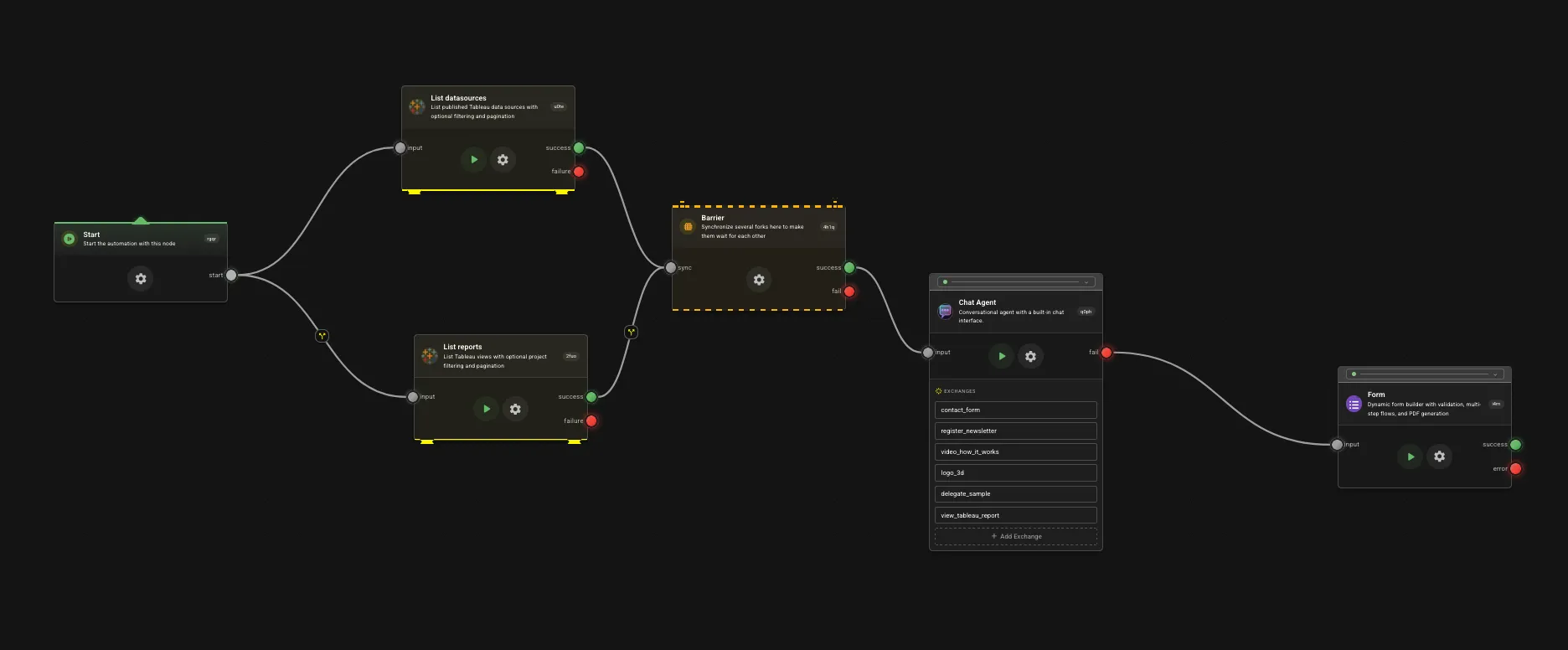
Behind the demo
- 01Tableau
Fetches the data sources and the reports up front, both at the same time.
- 02Barrier
Waits until both are in, so the chat opens with everything it needs.
- 03Chat Agent
Holds the conversation, and opens the tool you ask for beside it.
- 04Form
Takes over if the chat fails, so nobody is left looking at an error.
This is all there is behind the AI chat. You define a tool the same way you define a project: each tool behaves like a sub project and is a fork from the main graph. The AI can’t use any tool or access any data that you have not explicitly given it access to. To prefetch data from any system just connect them before the AI chat is loaded and bind the signals in the AI chat configuration.